
ServiceNow Business Rules are one of the most powerful server-side automation mechanisms on the Now Platform. When used correctly, they help organizations enforce data integrity, automate processes, and ensure consistent behavior across applications — all without relying on client-side logic.
This guide is written as a B2B technology tutorial for ServiceNow admins, developers, architects, and IT decision-makers. It explains what Business Rules are, their types, when to use them vs Client Scripts or Flows, real-world examples, pseudocode snippets, and debugging best practices.
Table of Contents
What Are Business Rules in ServiceNow?
A Business Rule is a server-side script that executes when a record is inserted, updated, deleted, or queried in a ServiceNow table.
They run on the server, meaning:
- They are secure (users can’t bypass them)
- They apply to all interfaces (UI, APIs, imports, integrations)
- They enforce data consistency at the database level
In simple terms:
If something happens to a record, a Business Rule decides what should automatically happen next.
Why Business Rules Matter in B2B IT Environments
In enterprise and B2B environments, ServiceNow often integrates with:
- CRM platforms (like Salesforce)
- ERP systems
- HR systems
- Automation and orchestration tools
Business Rules ensure that critical logic is enforced centrally, not scattered across UIs or integrations.
Typical B2B use cases include:
- Auto-assigning tickets based on priority or customer tier
- Enforcing SLA-related updates
- Preventing invalid data updates from integrations
- Synchronizing fields between ITSM, CRM, and automation systems
Types of Business Rules in ServiceNow
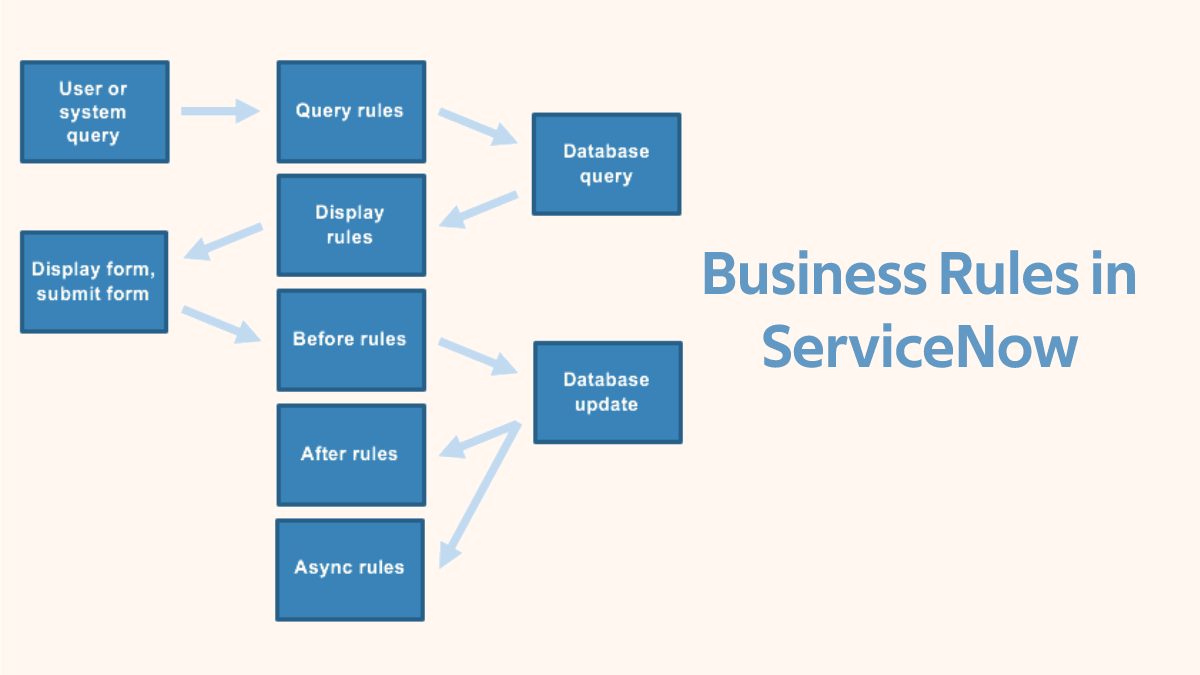
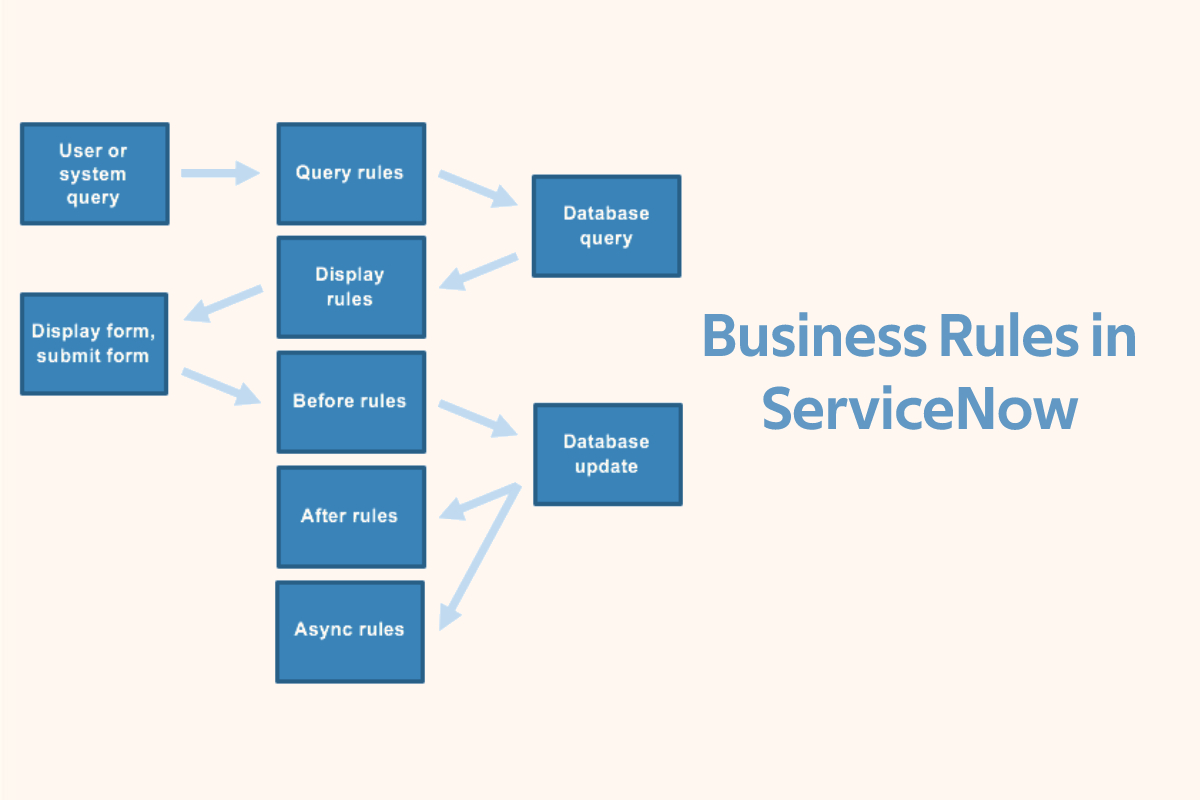
ServiceNow categorizes Business Rules based on when they execute during the database transaction lifecycle.
1. Before Business Rules
When they run: Before the record is saved to the database.
Best for:
- Data validation
- Auto-populating fields
- Aborting transactions
Example use case:
Prevent incidents from being closed without a resolution code.
Pseudocode:
if (current.state == 'Closed' && current.close_code.nil()) {
  gs.addErrorMessage('Close Code is mandatory before closing an incident');
  current.setAbortAction(true);
}
2. After Business Rules
When they run: After the record is saved to the database.
Best for:
- Triggering notifications
- Updating related records
- Logging audit data
Example use case:
Update a related CRM case when a ServiceNow incident is resolved.
Pseudocode:
if (current.state == 'Resolved') {
  var crm = new GlideRecord('u_crm_case');
  if (crm.get(current.u_crm_case)) {
    crm.status = 'Resolved';
    crm.update();
  }
}
3. Async Business Rules
When they run: Asynchronously, after the transaction commits.
Best for:
- Heavy processing
- Integrations
- External API calls
Example use case:
Send data to an external automation or CRM system without slowing down the user.
Why async matters in B2B:
Large enterprises often process thousands of records per hour. Async rules prevent performance bottlenecks.
4. Display Business Rules
When they run: When a form is loaded.
Best for:
- Dynamic UI behavior
- Read-only or visibility logic
Note: Client Scripts are often preferred, but Display Business Rules are useful when logic must be server-controlled.
Business Rules vs Client Scripts vs Flows
Understanding when not to use a Business Rule is just as important.
Business Rules
- Server-side
- Secure and global
- Ideal for data enforcement and integrations
Client Scripts
- Run in the browser
- Best for UI behavior (show/hide fields, form validation)
- Can be bypassed via API or imports
Flow Designer / Automation
- Low-code
- Great for orchestration and approvals
- Less control over complex data logic
Quick Comparison
| Use Case | Best Choice |
|---|---|
| Enforce mandatory data | Business Rule |
| UI field visibility | Client Script |
| Multi-step approvals | Flow Designer |
| Integration updates | Async Business Rule |
| Simple notifications | Flow Designer |
Best practice:
Use Business Rules for core data logic, and Flows for process orchestration.
Real-World Business Rule Scenarios
Scenario 1: Priority-Based Auto Assignment
Requirement:
High-priority incidents from enterprise customers should be assigned to Tier 2 support.
Logic:
- Check customer type
- Check incident priority
- Auto-assign group
Scenario 2: Prevent Invalid Updates from Integrations
Requirement:
Stop external CRM systems from reopening closed incidents.
Solution:
Use a Before Update Business Rule to block the action.
Scenario 3: Synchronize ITSM and CRM Data
Requirement:
Keep Salesforce cases and ServiceNow incidents in sync.
Solution:
- After Business Rule for internal updates
- Async Business Rule for outbound API calls
This pattern is common in CRM and automation hubs.
Best Practices for ServiceNow Business Rules
1. Keep Rules Focused and Small
Avoid monolithic scripts. One rule = one responsibility.
2. Use Conditions Instead of Script When Possible
Conditions are faster and easier to maintain.
3. Avoid Display Rules for Heavy Logic
They execute frequently and can slow form loads.
4. Prefer Async for Integrations
Never call external APIs in synchronous Business Rules.
5. Name and Document Clearly
Example:
BR – Incident – Prevent Closure Without Resolution
Debugging and Troubleshooting Business Rules
Use System Logs
gs.info('Business Rule executed for Incident: ' + current.number);
Check Execution Order
Business Rules run in order. Conflicting rules can override each other.
Use “setAbortAction” Carefully
Improper use can block updates unexpectedly.
Test with Different Entry Points
Always test:
- UI updates
- API calls
- Import sets
Performance Considerations
Poorly designed Business Rules can:
- Slow down form submissions
- Block integrations
- Impact platform scalability
Performance tips:
- Avoid GlideRecord queries inside loops
- Use indexes on frequently queried fields
- Disable rules during large imports when safe
Where Business Rules Fit in Modern B2B Automation
In modern technology-for-business ecosystems, ServiceNow often acts as the system of action, while:
- CRM systems act as systems of record
- Automation platforms handle orchestration
Business Rules ensure that enterprise-grade logic remains reliable, secure, and scalable — regardless of how many systems are connected.
Final Thoughts
ServiceNow Business Rules are not just scripts — they are foundational building blocks for enterprise automation.
When designed with best practices:
- They improve data quality
- Strengthen integrations
- Support scalable B2B workflows
Mastering when and how to use Business Rules will significantly elevate your ServiceNow architecture and long-term platform performance.